 |
|
You Are Here: Home > Articles > Testing & Tracking > Article
Testing Websites With Eye-Tracking by Will Schroeder
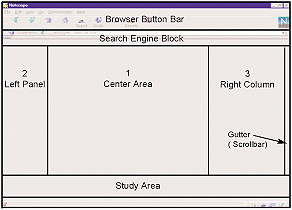
Thanks to some recent usability studies we conducted using an eye-tracking system, we now have real evidence of where users actually look when they view a web page. It's clear that users quickly learn to look where they expect to find content. They also quickly learn to avoid areas where they don't see—or expect—what they're looking for, including banner ads and parts of the page outside the central area. Where Did Users Look? Our client wanted to know how much attention users would pay to several areas of a prototype web page — and thus to the content of each area (see figure). With the eye tracker, we monitored how much time users looked at each area.
To determine where users looked on a prototype page, we tracked their eye movements within these areas. Users typically looked first in the center, then to the left, then to the right. When they encountered ads in the Center Area, they quickly learned to stop at the borders—and then look away. The figure shows the design grid for the client's index and navigation pages. We asked users to look for specific information on the site. When deciding which link to click, users typically looked first in the center area, then in the left panel, then in the right column. Users spent an average of 11 seconds on each of the pages we tested. Our users were more likely to investigate areas outside the Center Area when they spent more time searching for the correct link, or when they visited the page for the second or third time in a task. Scan Patterns Were Similar All the users spent the same proportion of time looking at each area. This similarity of behavior surprised us. We think it means that they all applied similar criteria in deciding on the relative importance of the tested areas—the likelihood each area would contain the link or information they wanted. New and experienced web users scanned essentially the same way. At first, the new user scanned pages from left to right, as if reading a book. But he quickly changed to the center-left-right sequence. He needed only 2 or 3 page visits to learn where to find the "good stuff"—and how to avoid less-interesting (to him) material. He looked at the browser controls more than the experienced users did, but was otherwise unremarkable. We had only a single new-to-the-web user, but this is an interesting pattern to watch for. Because these users so quickly adopted the center-left-right strategy, we believe the experienced users—who used it immediately—had learned the behavior through their earlier visits to other websites. This suggests that designers may not need to design pages differently for new web users, but we'd need more tests to confirm this. Users Don't Go to the Bottom Users rarely looked at what we called the Study Area just above the browser's status line. Users often found what they wanted before getting to this area. Interestingly, if they wanted to see information from this area, they scrolled to bring it higher on the screen rather than looking at the bottom. Some users failed to find content that began within this area; they apparently assumed that anything important would begin in the center area. For these users, the "fold" was 2/3 of the way down the first screen, not at the bottom. Users may not look where they don't expect useful material. New Scans for Some Changes We tested several variations of the site's prototype page layout to see if they'd alter user behavior. When the designers changed the proportions and content of the three main areas only slightly, users kept the same scan pattern. Horizontal and vertical grid changes of 6 to 12 pixels (1/8 inch at the resolution we tested) had no apparent effect on users. On the other hand, all users immediately detected a change that narrowed the left column about 30 pixels (1/3 inch) and used a heavier font. Most users scanned this changed area as soon as it appeared and read the content. Users apparently will reevaluate their scan strategy when they detect a design change of this magnitude. This argues against the design strategy of using a consistent grid on all pages—it may cause users to miss content of interest. Users seem to notice changes somewhere between 12 and 30 pixels, but we didn't test for this, so we don't know how big the change must be before users notice. What Attracted Users Using direct observations as well as videotapes of user behavior, we found that: 1) Bright colors and animation attract users' eyes. This is not a new finding, but it is interesting to actually see it happen. The gaze cursor flicks to the animation, dwells for an instant, and then returns to content. 2) Eye gaze often stopped at the borders around ads (the bottom of ads at the top of the page and the top of those near the bottom). To users, these lines apparently indicate content that is unimportant to their task. The Role of Peripheral Vision The eye tracker tells us where the users direct their central vision, the part of the visual field that can discriminate fine detail. But peripheral vision clearly plays a role. We can't measure how much, but we must account for peripheral vision in interpreting what users see. For example: 1) Users rarely looked directly at the scrollbar; their gaze peaked considerably to the left of it. This shows that they don't look at the scrollbar—even when using it. Peripheral vision obviously helped. 2) Ads apparently attracted users only when they related to the current task—even if the content interested users (but was irrelevant to the task). For instance, a lover of old automobiles was not attracted to an ad featuring a picture of an antique car. These observations are further evidence that peripheral vision plays a role: users somehow determined if an ad interested them before they looked directly at it. Extracted from User Interface Engineering.
Share this article:
comments powered by Disqus
|
|
| Internet Mastery Center has been providing Internet Marketing expertise since December 2003. Its mission is to ensure every aspiring marketer is well equipped with all the necessary Internet Marketing know-how and programs. |
Copyright
©
Internet Mastery Center. All rights reserved. Anti-Spam Policy | Terms Of Use | Privacy Policy | Affiliate Agreement | Site Map |